Restart Wireguard Server KD #16

Open
opened 2026-06-24 13:48:56 +07:00 by stephenk · 0 comments
Owner
Screenshot 2026-06-24 130204.png

Jika Status dari wireguard gagal / failed maka jalankan di server
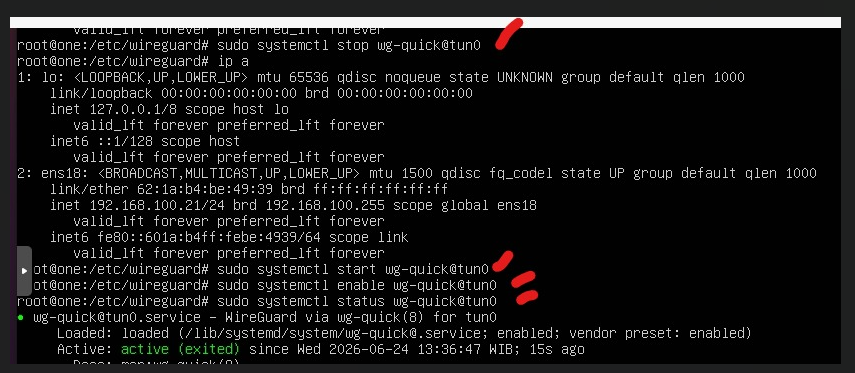
image.png

menjalankan di server ( Bukan pc interface )

image.png bisa dari lokal interface, buka browser, buka ip proxmox pilih server (lokal) , console dhu : 192.168.100.20
1. sudo systemctl stop wg-quick@tun0
2. sudo systemctl start wg-quick@tun0
3. sudo systemctl enable wg-quick@tun0

4. check status udo systemctl status wg-quick@tun0
<img width="524" alt="Screenshot 2026-06-24 130204.png" src="attachments/9f1851b2-8059-4fa2-8d6b-9e15b0486347"> Jika Status dari wireguard gagal / failed maka jalankan di server <img width="641" alt="image.png" src="attachments/b9068d94-796a-4ac8-bb07-307b755b6103"> menjalankan di server ( Bukan pc interface ) <img width="1079" alt="image.png" src="attachments/2508163a-a8b8-43b0-a0b1-25f40ee7af8f"> bisa dari lokal interface, buka browser, buka ip proxmox pilih server (lokal) , console dhu : 192.168.100.20 ``` 1. sudo systemctl stop wg-quick@tun0 2. sudo systemctl start wg-quick@tun0 3. sudo systemctl enable wg-quick@tun0 4. check status udo systemctl status wg-quick@tun0 ```
Sign in to join this conversation.
No Label
1 Participants
Notifications
Due Date
No due date set.
Dependencies

No dependencies set.

Reference: stephenk/Issue_KD#16